
Camera moves.
Eight moves for photos: Zoom In, Zoom Out, Move Left, Right, Up and Down, Cinematic Zoom, or keep it static. Videos get the same as Pan & zoom.
Where: Animate, then Camera moves.

 by rootlex
Motion
Give anything on your timeline a move: a slow zoom on a photo, a handheld shake, a title that slides in, or a path you draw with your finger.
Android 8.0 and up, 64-bit phones. Not on iPhone yet.
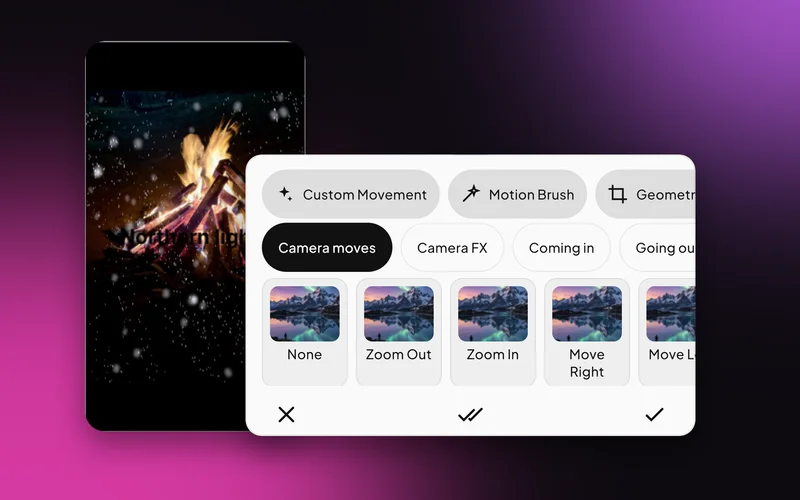
Eight moves for photos: Zoom In, Zoom Out, Move Left, Right, Up and Down, Cinematic Zoom, or keep it static. Videos get the same as Pan & zoom.
Where: Animate, then Camera moves.
Six moves with character: Low Wiggle, Handheld, Push In, Pull Back, Orbit and Pulse. Low Wiggle and Pulse keep going for the whole clip.
Where: Animate, then Camera FX.

Nine entrances (Fade, four slides, Zoom In, Pop, Spin, Bounce) and six exits for clips, text and stickers.
Where: Select a layer, then Animate, then Coming in or Going out.

Drag with one finger to record a path; pinch to zoom and twist to turn as you go. Then choose the speed, how smooth it is, an easing like Bounce or Spring, and when in the clip it plays.
Where: Animate, then Custom Movement.

Put an object where it should end up and Swish glides it there from where it started.
Where: Animate, then Geometric.

A slow push in on each photo turns a set of stills into a film.
Slide a heading in, pop a sticker, fade the outro out.
Record the exact path you want: a sticker that flies across, a photo that swings into frame.
Yes. Apply to all clips sets one move across the whole project.
Yes. Every layer can take an entrance, an exit, a custom move or a glide to its final pose.
Yes. You can change its speed, smoothness and easing, fine-tune its timing, position, size and turn, reverse it or redraw it.
Low Wiggle and Pulse repeat for the length of the clip. The others play once.
Yes. Editing, previews and saving all happen on your phone. Only sign-in and AI edit use the internet.
Swish is on Google Play. Install it, pick a photo, and show it what moves.
Get it onGoogle PlayAndroid 8.0 and up, 64-bit phones. Not on iPhone yet.